The Lowdown | ShutterFest 2026
Welcome to ShutterFest.
If this is your first time here, just know this isn’t your typical conference. It’s not overly polished and it’s definitely not built for spectators. It’s built for photographers who actually want to grow.
You’ll have real access to educators. No ego. No celebrity energy. Just people who care about this industry and are willing to share what they know. You’ll meet photographers who will push you creatively and probably turn into long-term friends.
If you’re looking for perfectly structured and predictable, this might not be your thing. ShutterFest runs on momentum, connection, and a little bit of controlled chaos. That’s where the breakthroughs happen.
Want to focus on business? Live in the classrooms.
Want to build your portfolio? Shoot nonstop.
Want a little bit of both? Only you can make it happen.
This week is yours.
It can feel overwhelming at first. That’s normal. Every year people walk in not knowing anyone. By the end of the week, they’ve found their people.
Jump in. Start conversations. Support the vendors who make this event possible. Shoot. Learn. Stay a little later than you planned.
And tag us so we can see what you create. #ShutterFest
Schedule Overview
Monday, April 6th, 2026
2:00PM – 8:00PM: Registration Opens
Arriving Monday evening? Grab your badge early and beat the Tuesday morning lines.
7:15PM – 8:15PM: Newbie Walking Tour
Hosted by Bethany Ellen, Joyce Geiser, Jocey Wright, and Ted Anderson. Meet at the Grand Hall Prefunction area and tour all the important areas that you need to know about before the event officially starts. So you will be ready to rock on day 1! We will cover classroom areas, shooting areas, non-shooting areas, and answer your questions along the way.
Tuesday, April 7th, 2026
7:00AM – 4:00PM: Registration
Pick up your badge – you’ll need it to walk through the trade show floor and get to your classes.
9:00AM – 10:30AM: Welcome & Opening Keynote with Sal Cincotta
An opening you won’t want to miss!
9:00AM – 4:30PM: Rent-A-Human (RAH)
Find yourself with a free class slot, or even just 30 minutes of time? Head to the Rent-A-Human station and request a model to work with. You can do RAH by yourself or with a group of 2-5 photographers and shoot all over Union Station.
10:45AM – 12:45PM: Class Time (90 min/120 min hands on)
See the full class lineup at: https://shutterfest.com/classes/
12:00PM – 4:30PM: Lunch, Vendor & Hands-On Time
No classes, but that doesn’t mean no learning! During this down-time, you can:
- Visit the vendors on the trade show floor for product demos, photo walks, and more.
- Grab a model from Rent-A-Human and head anywhere in Union Station – including the Creator Lab or Nanlite Boudoir Bays for some hands-on shooting time.
- Check out the local St. Louis food trucks we’ve brought in (final lineup below) or one of the many food options in and around Union Station.
- Got a photoshoot idea? “After hours” shoots are allowed from 1PM -3PM with any models NOT scheduled to be in RAH, so let your creativity go wild.
4:30PM – 6:30PM: Class Time (90 min/120 min hands on)
See the full class lineup at: https://shutterfest.com/classes/
4:30PM – 6:30PM: Creator Series LIVE
Join us in the Creator Lab to watch photographers compete live in the Creator Series challenge, hosted by Sal Cincotta. Participants will be required to audition and contestants will be selected before ShutterFest – more details coming soon.
8:00PM – Midnight: Mob Bosses & Mob Wives Theme Party
The opening night party is held in the Union Station Grand Hall. All attendees are welcome! Costumes are not required, but always enjoyed 🙂
Wednesday, April 8th, 2026
8:00AM – 12:00PM: Registration
9:00AM – 4:30PM: Rent-A-Human (RAH)
Find yourself with a free class slot, or even just 30 minutes of time? Head to the Rent-A-Human station and request a model to work with. You can do RAH by yourself or with a group of 2-5 photographers and shoot all over Union Station.
9:00AM – 10:30AM: Class Time (90 min)
See the full class lineup at: https://shutterfest.com/classes/
10:45AM – 12:45PM: Class Time (90 min/120 min hands on)
See the full class lineup at: https://shutterfest.com/classes/
12:00PM – 4:30PM: Lunch, Vendor & Hands-On Time
No classes, but that doesn’t mean no learning! During this down-time, you can:
- Visit the vendors on the trade show floor for product demos, photo walks, and more.
- Grab a model from Rent-A-Human and head anywhere in Union Station – including the Creator Lab or Nanlite Boudoir Bays for some hands-on shooting time.
- Check out the local St. Louis food trucks we’ve brought in (final lineup below) or one of the many food options in and around Union Station.
- Got a photoshoot idea? “After hours” shoots are allowed from 1PM -3PM with any models NOT scheduled to be in RAH, so let your creativity go wild.
4:30PM – 6:30PM: Class Time (90 min/120 min hands on)
See the full class lineup at: https://shutterfest.com/classes/
6:00PM – 9:00PM: Creator Lab & Boudoir Bays After Hours
Bring a model and create after hours magic in the Creator Lab or Nanlite Boudoir Bays with access to all the shooting bay sets and gear from Westcott, Nanlite, Intuition, and more. Just remember to share and play nice with your fellow photographers 🙂
8:00PM – Midnight: Bada-Bing UNO
An UNO tournament in Ballroom C with Cincotta house rules and prizes for the winner!
Thursday, April 9th, 2026
9:00AM – 10:30AM: Class Time (90 min)
See the full class lineup at: https://shutterfest.com/classes/
9:00AM – 4:30PM: Rent-A-Human (RAH)
Find yourself with a free class slot, or even just 30 minutes of time? Head to the Rent-A-Human station and request a model to work with. You can do RAH by yourself or with a group of 2-5 photographers and shoot all over Union Station.
10:45AM – 12:45PM: Class Time (90 min/120 min hands on)
See the full class lineup at: https://shutterfest.com/classes/
12:00PM – 4:30PM: Lunch, Vendor & Hands-On Time
No classes, but that doesn’t mean no learning! During this down-time, you can:
- Visit the vendors on the trade show floor for product demos, photo walks, and more.
- Grab a model from Rent-A-Human and head anywhere in Union Station – including the Creator Lab or Nanlite Boudoir Bays for some hands-on shooting time.
- Check out the local St. Louis food trucks we’ve brought in (final lineup below) or one of the many food options in and around Union Station.
- Got a photoshoot idea? “After hours” shoots are allowed from 1PM -3PM with any models NOT scheduled to be in RAH, so let your creativity go wild.
4:30PM – 6:30PM: Class Time (90 min/120 min hands on)
See the full class lineup at: https://shutterfest.com/classes/
8:00PM – Midnight: Closing Party
Send off another great ShutterFest with new & old friends, a DJ, and good vibes in the Grand Hall of Union Station.
Friday, April 10th, 2026
9:00AM – 4:45PM: SF+ classes
SF+ is an additional day with smaller classes geared to more advanced learning. Learn more at https://shutterfest.com/sf-plus/
Trade Show & Vendors
The trade show is open from 12:00PM – 4:30PM daily. Come see our vendors, chat about their products & services to see how they can fit in to your business and help you grow! Don’t forget to get a passport sticker from every vendor you visit. Check out the latest vendor lineup in the ShutterFest app or on the vendor page.
Site Map
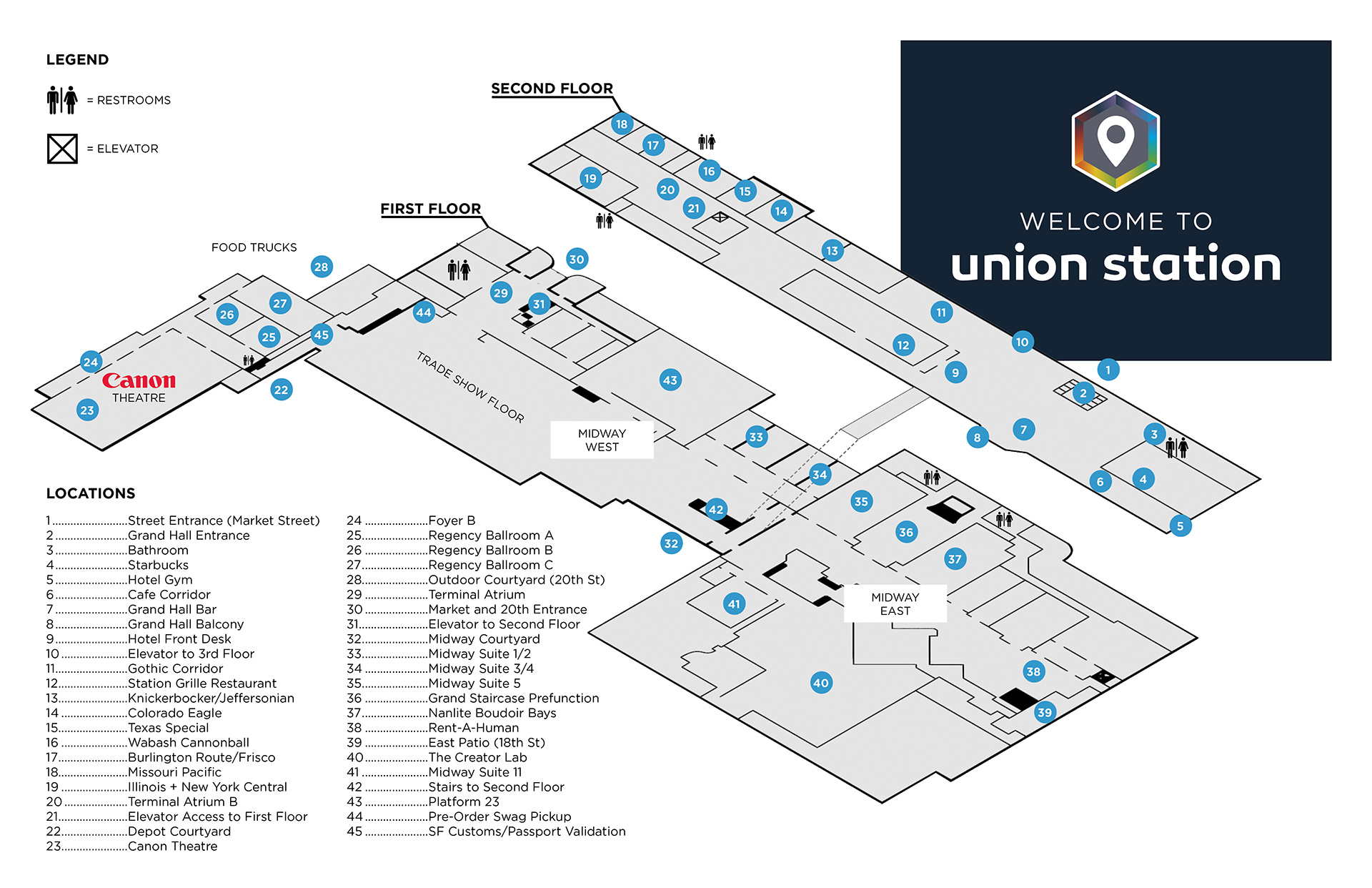
Union Station Is Cashless
As of 2024, Union Station is cashless. This includes the bar, Station Grille Restaurant, coffee shop, bloody mary & mimosa bars, coffee stations, “cash” bars, and sleeping rooms. Tips can still be given in cash. Vendors on the trade show floor may or may not take cash – this is up to the individual vendor. Make sure to plan accordingly!
The App, Class Sign-ups, & Classes
YOU WILL NOT BE ABLE TO LOG IN TO THE APP UNTIL MARCH 9th, 2026.
The app will not recognize your email address until march 9th, 2026.
CLASS SIGNUPS WILL BEGIN IN THE APP ON March 23rd, 2026 AT 11:00 AM CENTRAL TIME
(ST. LOUIS TIME).
On March 9th around 11:00 AM (the invitations go out in segments), we will send an email invitation to the app to THE EMAIL YOU ENTERED IN THE “APP INVITATION EMAIL” FIELD WHEN YOU BOUGHT YOUR TICKET. This invitation email will be sent from guidebot@guidebook.com. Add this to your address book NOW, to ensure you receive the email. Check your junk folder. This invitation could get flagged as spam. If you don’t get the invitation by the end of the day on March 9th, reach out to us (support@behindtheshutter.com) so we can resend it.
Does the app work on a tablet/iPad? Yes. If you can access the app store, you should be able to download and use the app.
Does the app work on a laptop or desktop? Yes! You can access the app via a web browser at https://builder.guidebook.com/g/sf26
Do I have to register for classes? Yes. Space is limited. The system will only allow you to register for one class per time slot. So be sure to register for your MUST-HAVE classes first.
How do I sign up for classes? In the app, there will be a “plus” button next to each class. Click the plus button to register for a class. It’s really that easy.
How can I see what classes I am currently registered for? Log into the app to track the classes you are registered for by clicking “My Schedule” in the navigation bar. Select the date to see your schedule for that day. We recommend taking a screenshot or writing down your schedule in case there are issues with WiFi in the hotel.
What if I change my mind and want to register for a new class? No problem. When viewing your schedule within the mobile app, click the button next to the class you would like to remove. It should ask you to confirm that you want to unregister. REMEMBER: Classes are first come first serve. If the class you’re dropping is full, your spot will be immediately released to the first person on the waitlist. Once you’ve confirmed you want to unregister, you will be able to register for the new class.
Can I reserve a spot for someone else? No. They must register themselves with their own account.
How many classes can I register for? You can sign up for one class per time slot.
There are too many classes. How will I attend them all? Welcome to ShutterFest, ladies and gentlemen. You will never, let me repeat, NEVER attend every class, every shooting exercise, every outdoor class, and that is the point. We created ShutterFest to be overwhelming. We want there to be TOO much good information and too much to do. Some advice: What are your goals? Where are you weak? What are the 3 or 4 things you want to walk away with from ShutterFest? Find those courses and go at it full power!
What if the class I want is completely booked? We don’t guarantee any single class, but don’t fret. ShutterFest is not about any single class. You have access to Photo Walks, the Creator Lab, The Canon Experience, Nanlite Boudoir Sets, Rent-a-Human, and tons of classes and shoots on the trade show floor. We promise, you will not be disappointed. Pivot, try something different, and enjoy the conference. It’s unlike anything you have ever been to.
AGAIN, we do not guarantee access to any single class. Add yourself to the waitlist or sign up for another class. People drop in and out of classes all the time, so you never know if a spot will open.
If I don’t like the class I’m in, or am not registered for a class. Can I just switch and go to another class? If there is open capacity in the class, yes. You will need to check in with the speaker or speaker assistant so they can mark you present. Be respectful of your fellow attendees. Nobody likes the person that jumps in front of everyone in line in a class they didn’t even register for, so don’t be that person. 🙂
Will I get a chance to shoot in a hands-on class? The expectation of a hands-on class is that you get a chance to shoot. Hands-on classes can be crowded, but we have implemented class attendance to make sure that your hands-on class doesn’t get overwhelmed by drive-by shooters. Speakers are encouraged to split attendees into smaller groups to give everyone a chance to shoot. We assign multiple models to most hands-on classes to help with this. Don’t want to be in a crowded class? Perfect! Grab a small group of people and a model and start your own hands-on shoot with Rent-A-Human.
What’s the difference between lecture, live demonstration, and hands-on classes?
- Lecture: These are non-shooting courses. Typically classroom based, bring your laptop and notepad and focus on learning!
- Hands-On: These are shooting courses. You will be shooting and working. Bring your camera, gear, or whatever you need for the course and to create images. Expect to have some level of shooting.
- Live Demonstration: These are instructor-led courses where you will see a live demonstration of what the instructor is teaching. You can still bring your cameras to these courses and you can photograph, but the goal of the course is NOT for you to shoot or to ensure you get a shot. The goal is for you to see how and why the instructor does what he/she does in order to get the final result.
Is there an additional fee for classes? Nope! Unlike other conferences, there are no additional or hidden fees. Don’t see a course you like, or the one you want is completely booked? Not a problem, check out the Rent-A-Human program or practice your lighting at the Creator Lab, Boudoir Bays, or other Shooting Bays.
Can I teach my own class? No. This is not allowed per event rules. If you would like to be an instructor, apply to teach and your time will come. As an attendee at the event, attend the courses and the program we have assembled for you. We have spent a lot of time and energy to put together an amazing program for you with some of the best speakers and educators out there. Enjoy the conference. Now, that’s not to say you can’t help one another. Of course you can, that’s the culture of ShutterFest. However, it sends the wrong message to attendees if random people decide they want to be instructors. The hotel and its property is 100% paid for by ShutterFest, please respect that.
What if I want to shoot the entire conference? Perfect! You have come to the right conference. Check out the Rent-A-Human program. You can shoot with models on your own or in a group. We have ~300 models for you to work with for FREE.
Will we get slides from the classes? Yes, IF you receive the goodie bag (see below), you will receive all of the slides that have been turned in to us by speakers.
Newbie Meetup & Walking Tour
New to ShutterFest and overwhelmed? Join the Newbie group for tips, tricks, and advice to make your first event a great one. Get the lay of the land and figure out where all the classrooms, bathrooms, photo spots and vendor booths are on Monday evening with a walking tour of Union Station from 7:15 PM – 8:15PM. Hosted by Bethany Ellen, Joyce Geiser, Jocey Wright, and Ted Anderson.
Creator Series Live
You’ve seen the Creator Series on YouTube. You thought, “I could do that!” Well, here’s your chance to compete for real. We’re selecting five photographers to go head-to-head on Creator Series LIVE on Tuesday, April 7th in the Creator Lab at ShutterFest 2026. We’re looking for people to show up with skills, confidence, and the ability to perform under pressure. If selected, you will have just 10 minutes to create your best straight-out-of-camera image to be judged by Sal and two other ShutterFest instructors. The top scoring image wins.
Creator Lab
Try it. Shoot it. Buy it. Step into the Creator Lab, where hands-on experience meets creative growth! This is your chance to step into fully stylized sets, work with top-tier gear, and create stunning images in an immersive, hands-on learning environment. Whether you’re testing out new cameras, lenses, lighting, or backdrops, or just refining your skills, this is where you level up. CLICK HERE TO LEARN MORE.
Bring a model from Rent-A-Human to shoot in any of the available shooting bays. Get your hands on lighting, modifiers and gear from Westcott, Nanlite, TogDrop and Pixel Connection. Shoot on backdrops and stylized sets from Intuition Backgrounds. Cull and edit with AfterShoot.
Location: Midway East, across from Midway Suites 7/8.
Do I need to pre-register to use the Creator Lab? No! This will be first come first serve. Volunteers will be available to assist you.
Creator Lab Hours:
April 7th: 9AM – 4:30PM // Closing early for Creator Series LIVE
April 8th: 9AM – 6PM & AFTER HOURS from 6:00PM – 9:00PM
April 9th: 9AM – 6PM
NANLITE Boudoir Bays
We’ve teamed up with Nanlite to put together four KILLER stylized boudoir sets for you to use during event hours! Nanlite lighting will be available for use along with props, beds, and more. This space can be used for Rent-A-Human as well!
Where are the Boudoir Bays? The Boudoir Bays are located in Midway East in Midway Suite 6.
How do the Boudoir Bays work? The Boudoir Bays are first come, first serve. Volunteers will be in the Bays to manage time spent shooting. What does that mean for you? If you’re there during a busy time, you may not be able to work in one bay for an extended period of time. You may be asked to rotate with other photographers in the space, to allow everyone a chance to shoot and work.
Volunteers will be on hand to answer questions and assist you.
Nanlite Boudoir Bay Hours:
April 7th: 9AM – 6PM
April 8th: 9AM – 6PM & AFTER HOURS from 6:00PM – 9:00PM
April 9th: 9AM – 6PM
ShutterFest Passports
This year, we’re making it easy to hit the whole trade show floor, connect with vendors, get a cool ShutterFest keepsake, and maybe walk away a grand prize winner. Greetings From ShutterFest!
When you get your badge, you’ll receive your ShutterFest Passport booklet. In the lobby, there will be a station to take your passport photo, print it on site with Canon Printers, and stick it in your booklet.
Inside, you’ll find spaces for all our vendors, the Creator Lab and Rent-A-Human. Your mission: visit every location in the booklet and get a sticker from that station. Every station has different stickers, so no cheating. 🙂
When your passport is fully filled out, bring it to Customs – the ShutterFest Passport Validation Station. The team will validate your passport and enter you to win our Grand Prize giveaway valued at over $2,500. Your passport booklet is yours to keep!
The deadline to get your passport validated is 4:30PM on Thursday, April 9th.
Sal will be drawing the Grand Prize winner LIVE at the closing party on Thursday night (around 10PM). You must be present to be crowned the winner.
The Canon Experience
Welcome to The Canon Experience—get your hands dirty and your minds fueled in this creative space. Come to learn, create, and be inspired. This is an immersive experience designed to challenge you, fire you up, and leave you walking away with real, actionable skills.
Where is the Canon Experience? The Canon Experience is inside of the Creator Lab.
Can we shoot in the Canon Experience? Yes! Shoot in fully stylized sets.
Will CPS be there? Yes! Got a dirty sensor? Need a gear checkup? Bring your Canon gear in for a cleaning and inspection by Canon’s expert technicians.
What else can we do in the Canon Experience? Print your images! Each attendee can print one image for free at ShutterFest on Canon’s PRO printers. You can also take Live Demos and Classes from Explorers of Light and Canon Pros throughout the event. Look for these classes in the ShutterFest App.
T-Shirts & Swag
How do I get a t-shirt? We’ve teamed up with PhotoFlashDrive to bring you ShutterFest branded t-shirts, hoodies, sweatpants, and more! ShutterFest Swag will be available for pre-purchase as well as at the show. CLICK HERE TO PURCHASE!
When is the deadline to order? Pre-orders close on March 22, 2026.
I preordered a t-shirt. How do I pick it up? You can pick up pre-ordered items during trade show hours (12PM – 4:30PM daily. Extended hours may be available at vendor discretion – walk by the booth to see if staff members are present) at booth #72, Photo Flash Drive booth.
How do I get a t-shirt at the event? How much are they? Limited quantities will be available for purchase at booth #72. Items will be priced as marked.
I can’t attend the event, but I still want some swag! Can you ship it to me? YES! Contact cs@photoflashdrive.com to inquire about direct shipment for those not attending this year.
Event Check-in/Registration
Registration will be in the Grand Hall of Union Station and you will need your photo ID to check in and get your badge.
What time will registration be open?
Monday: 2:00 PM – 8:00 PM
Tuesday: 7:00 AM – 4:00 PM
Wednesday: 8:00 AM – 12:00 PM
Thursday: 8:00 AM – 12:00 PM
What do I need for registration? Your driver’s license or photo ID. You will not be able to check in without it. Not even if your dog ate it.
Is there a deadline to get a badge with my name on it? Yes, because the badges are printed about a month in advance. If you purchase your ticket after March 4th, you will not get a badge with your name on it. We will have “random name badges” for you. Don’t worry, sometimes the fake names we come up with are even better than having your real name. 😉 Plus, it’s a great conversation starter!
Do I need to have anything printed? Nope! Just your driver’s license or photo ID. We have a list of names at the registration desk.
Can I pick up my friends/spouses/other badge? No. They will have to come and show their ID to pick up their badge.
I don’t have a ticket. Can I just show up? We love all photographers, but for this event, you need a ticket! There is no guarantee you will be able to purchase a ticket at the door, but if there is space left, you can. The price for a general admission ticket will be $399. You snooze, you lose. Don’t wait. Buy your ticket now – https://shutterfest.com/register/.
Can I transfer my ticket or get a refund? No. This has been outlined dozens of times and it’s even listed on the site before you order your tickets. There are a multitude of reasons why we have this policy. Here is the main reason – the event is THE most inexpensive educational event on the PLANET bar-none. The event is also limited in size – once it sells out – it’s sold out! We are offering you hands-on shooting, portfolio building, top level educators – would cost $1k at other events. You know what you paid for your ticket. Well, in the beginning, people were buying 5 tickets at a time and selling them on eBay for $500 and that goes against the event and why we created it. Hence, no transfers or refunds. This ensures that no one can scam the system and we keep your ticket price affordable. So death, charities, mission trips, terminal illness, can’t afford to come, and the dozens of requests or reasons for a transfer or refund, our sincerest apologies, but this is a policy that has no wiggle room. We hope you understand the in-depth explanation we have provided.
Goodie Bag
As you are all aware, ShutterFest is EXTREMELY affordable compared to other conferences of this size. We can do this because of the negotiated terms with the host hotel. As a thank you for supporting the event and staying in our room block at the host hotels, everyone staying in our room block at Union Station or the Hilton Ballpark will get access to the goodie bag.
To receive access to the goodie bag you must be:
- An attendee at ShutterFest. Don’t expect to get goodie bags for your husband, friend or dog whose name is on the room but not attending ShutterFest. Stop gaming the system. 🙂
- Booked under the SF26 ROOM BLOCK (all 4 nights) and have your name on the hotel room by April 4th, 2026 @ 11:59 PM CST. NO EXCEPTIONS. Adding names to reservations after April 4th is allowed, they just won’t get the goodie bag.
How do I add my name to a room reservation at the host hotel? The only person that can add names to a room reservation is the person that made the reservation. For example: If John made the reservation, John can add Kim, Cindy, and Donnie. Donnie cannot add himself to John’s reservation – only John could do that.
So, if you want to be added to a room reservation to get a goodie bag, you will simply need to have the person who booked the room add your name to the reservation. This can be done 1 of 2 ways:
- Add all additional guest names to the reservation at the time of booking (this can be done both online or if you’re making a reservation over the phone).
- If booking is complete and you wish to add guest names later, the person whose name is on the original reservation can call the hotel to add additional guest names. Tip: ALWAYS make sure you receive the confirmation email so you have proof.
There’s no need to mention goodie bags when you call, just make sure your room is booked inside the ShutterFest room block and you have any additional guests confirmed on your room.
Why do I have to stay at the host hotels to get a goodie bag? Well, quite simply and transparently, we get a major discount for the hotel meeting spaces if our attendees stay at the host hotel. These savings are passed on to you in the form of an incredibly LOW registration fee. There is no other conference loaded with this much education for this price. Anywhere!
So, the goodie bag is an incentive and reward for those who stay at the host hotel and help support the event. If not, we would have to raise prices for the event and no one wants that.
How do I get the goodie bag? When you get your badge at registration, we will check your name against our goodie bag list and hand them out with your badge. If you’re staying at the host hotels, but don’t receive a goodie bag, just show us your confirmation email and we will get you taken care of.
Trying to game the system will only serve to frustrate the event and the spirit of ShutterFest. The bags are there to entice you to stay at the host hotel to keep ticket prices low for everyone. Gaming this by adding people to your room that are not staying at the hotel, etc will lead to bags being forfeited for the entire room if caught. If you have a problem with this please message Sal directly – there will be no exceptions to this policy.
Will I receive a goodie bag if I stay at the host hotel for one night then switch hotels? No. Stop gaming the system. You have to be part of the ShutterFest room block (all 4 nights) and room rate for ShutterFest. This is a reward for staying at the host hotel – which is giving the event an EXTREMELY reasonable rate in return for the hotel rooms being booked. And guess what? This keeps your ticket price low.
What’s in the Goodie Bag? Savings & specials from our vendors, and speaker slides from the speakers who turn them in to us! Speaker slides are sent out via email after the event, so we can ensure we have as many slides for you as possible.
Gear
What gear should I bring? Bring whatever you want to shoot with (and are willing to drag around the event) — camera bodies, lenses, flashes, triggers, tripods, soft boxes, etc. It’s a shooting conference. You’re a photographer. Do the math. Bring your laptop, memory cards, a notebook to take notes with, snacks, etc.
Is there a place to store my gear at Union Station? Nope, unless you’ve got a friend that has a room. So pack light, or invest in a rolling cart!
Will there be gear to rent at the event? Unfortunately, there will be no gear rentals for 2026.
Will Canon CPS be back? To be determined.
Can I buy gear at the show? Yes. The Pixel Connection will be selling camera gear.
Food
Food Trucks: We will have some of STL’s most delicious food trucks at ShutterFest. On April 7-10, we will have food trucks on site for lunch and dinner. We know. It’s pretty bad-ass. Conference food already sucks, so we wanted to do something that was ShutterFest-worthy. And no, we are not paying for your lunch.
What kind of food trucks will be there?
Lunch | 12:00 PM - 3:00 PM
Dinner | 4:00 PM - 7:00 PM
Lunch | 12:00 PM - 3:00 PM
Dinner | 4:00 PM - 7:00 PM
Lunch | 12:00 PM - 2:00 PM
Coffee, Mimosas & Bloody Mary Stations: We will have coffee stations where you can purchase that sweet, sweet caffeine each morning from 7AM – 11AM (locations around the trade show/hotel TBD). And, for you ShutterFesters who take the “Party” in “Shoot. Learn. Party.” seriously, we will also have mimosas and bloody mary stations from 7AM – 11AM (locations TBD).
Cash(less) Bars: From 12:00PM – 4:30PM daily we will have cash(less) bars with drinks available for purchase on the trade show floor.
Other Restaurants in & Around Union Station: Click here for the most up to date list of food options at Union Station. Landry’s is located outside near the lake. The Soda Fountain restaurant is located outside Union Station (where the Hard Rock used to be). The Train Shed is located outside the aquarium. The 1894 Cafe is located on the second floor of Union Station by the Hall of Mirrors. Station Grille is located right behind the Grand Hall on the second floor of Union Station. Starbucks is located in the Grand Hall by the gym. Food can be purchased from the bar in the Grand Hall Lobby.
SF+
Stay an extra day for some EXTRA learning! (P.s. it’s not too late to add it on. CLICK HERE TO ADD.) SF+ is an entire day dedicated to advanced photography classes, held the day after the general conference. Think smaller classes, and deep dives (and you don’t have to run all over Union Station to get to class).
When is SF+? SF+ takes place on April 10th from 9:00AM – 4:45PM.
Where is SF+? All SF+ classes are held in the Canon Theatre rooms.
Do I need all my camera gear? SF+ classes are all live demo/lecture-style, so no camera gear required.
How do I register for SF+ Classes? No need to register for the classes you want to take! On the day of SF+, there will be two classes going on during each class period. Just walk right in to the one you’d like to attend.
Will there be food? Food Trucks will be there for the lunch break, which lasts 1 hour.
Is there transportation? There will be a FREE shuttle running from the Hilton Ballpark hotel to Union Station from 8:00 AM – 12:30 PM and 4:30 PM – 6:00 PM.
SF+ Schedule:
9:00 AM – 10:30 AM: Ray Alvarez & Doug Weittenhiller
10:45 AM – 12:15 PM: Esteban Gil/Mandy Wright & Alissa Cincotta
12:15 PM – 1:15 PM: LUNCH
1:30 PM – 3:00 PM: Amanda Rae & Ric Lewis
3:15 PM – 4:45 PM: Esther Kay & Sal Cincotta
SF+ Topics:
Sal Cincotta – Turning Content Creation Into a Scalable Commercial Business
Alissa Cincotta – How to Photograph Women Over 60
Esteban Gil & Mandy Wright- More Than Moments: Redefining Wedding Photography
Ray Alvarez – Lighting With Intent: Advanced Portrait Lighting
Amanda Rae – Work Smarter, Not Longer: Systems, Automation, and Workflows That Scale
Esther Kay – Creating Luxury Set Designs Clients Can’t Ignore
Ric Lewis – The Finishing Touch: Post-Production Techniques
Doug Weittenhiller – How to Actually Reach Your Audience in a Broken Email World
Parties
Did someone say party?! Join in the fun, connect with new friends and old buddies, and dance the night away! “Party” IS one of our mantras, right?
Tuesday, April 7th | 8:00PM – Midnight
Location: Grand Hall Lobby
A Family Affair: Mob Bosses & Mob Wives
Break out the hairspray, leopard print, and the gaudiest accessories you can find, because it’s Italian Mafia time. (costumes encouraged but not required!)
Wednesday, April 8th | 8:00PM – Midnight
Location: Regency Ballroom C
Bada-Bing UNO Tournament
Thursday, April 9th | 8:00PM – Midnight
Location: Grand Hall Lobby
Closing Night: Send ShutterFest off with a chill closing night get-together.
Do I HAVE to dress up for the party? No, absolutely not! Come as you are and enjoy the fun.
WTF is Bada-Bing UNO? It’s UNO, (yes, the card game) Cincotta-Style. We use Sal’s house rules and play a giant UNO tournament. The WINNERS will receive some badass prizes! Team Cincotta will be there to answer any rule questions and help you out. WATCH THIS VIDEO TO CHECK OUT THE RULES.
Do I have to sign up for UNO? Yes, signups will be in the app like regular classes. If you don’t get a spot, don’t fret! You are welcome to hang out with us, enjoy a credit card bar, talk some trash, (it’s a very important part of the game) and grab a seat at the table if someone no-shows or bows out.
Is there a theme for the Thursday Night party? Nope, come as you are and have fun! Just don’t fall asleep, or you may get #slumberfest-ed.
Top Talent Competition
Collaborate. Shoot. Enter for a chance to win cash & prizes!
The Top Talent Competition is BACK. Every image you send to models through the ShutterFest Model Gallery earns you a chance to win. Click here to see more info, past winners, and prizes.
Daily Image Challenges
Upload your images during ShutterFest for a chance to win each day!
Every day, Team Cincotta will be selecting THREE of their favorite images that were uploaded to the model gallery. The winning images will be announced via email and the ShutterFest group and get prizes. Click here to learn more.
Rent-A-Human (aka RAH)
Aptly named by our comedian from ShutterFest 2014, Pat McGann, this is now the name of our model program.
What is Rent-A-Human? This is our FREE modeling and portfolio building program at the event. Since ShutterFest is a hands-on shooting conference, we realize the need for lots and lots of models. Work hands-on and practice what you’ve learned in class with a model across many genres: High School Seniors, families, babies, children, fashion, boudoir, weddings, general portraits, fitness, same-sex and more.
Do I have to pay to rent a model? No. The Rent-A-Human program is completely free.
Do I have to have my own model release form? Model releases have been signed by all models prior to the event, and you are completely covered for official ShutterFest classes, Photo Walks, and Rent-A-Human sessions. For after-hours shoots, you WILL need to obtain your own release.
When can I rent a model?
Tuesday: 9AM – 4:30PM
Wednesday: 9AM – 4:30PM
Thursday: 9AM – 4:30PM
Can I plan my own after hours shoots? Shooting after hours is not only encouraged, it’s expected. ShutterFest is something that goes on all day and into the late hours of the night. After hours shoots can be done:
Monday: anytime, as long as it doesn’t conflict with the mandatory model meeting from 7:00 PM – 8:00 PM.
Tuesday-Thursday: before 9:00 AM, between 1:00PM and 4:00PM IF and ONLY IF the model is not scheduled for anything, or after 4:30 PM. (NOTE: classes take priority, models may be scheduled for a class after 4:30)
How does Rent-A-Human work? You can form a group of 2-5 photographers and work for 1.5 hours anywhere in Union Station (this is called Rent-A-Human Classic), OR work with your model on your own for 1 hour anywhere on the trade show floor, including the Creator Lab, Boudoir Bays, and outdoor courtyards. (this is called Rent-A-Human express) When you’re finished shooting, check your model back in at the RAH station.
How long do I have to shoot with my Rent-A-Human model? For Rent-A-Human Classic, you will have 1.5 hours to work with the model. For Rent-A-Human Express, you will have 1 hour to work with the model.
We will be monitoring check out times and return times. If you are late returning the models, you will no longer be allowed access to the Rent-a-Human program for the remainder of the event. Please note – this applies to your entire team. You are a team – you win together, you lose together.
How many models are there? We will have ~300 models at this year’s event
Hair & Makeup: Refine Beauty will be curating a team of artists from their salon as well as a team of students from local cosmetology schools to provide top-notch hair and makeup for models!
Can I bring in my own hair & make up artist? If you would like to bring your own hair and makeup artists, they will not be able to set up inside Union Station.
What kind of wardrobe is available through Rent-A-Human? We will have over 60 wedding and fashion gowns – many from Team Cincotta’s own wardrobe – that the models will be able to utilize. Models are also instructed to bring other outfits for their shoots. If you are looking for a stylized shoot, feel free to bring an outfit or two of your own.
Can I pick the model or category I want to shoot? You can specify two category choices on your Model Request form – we will do our best to supply you with your first request, but we cannot guarantee that model type will be available. Models are based on availability, time of day, etc. Again, you are not guaranteed any specific model or genre. We will do our best. Models CAN NOT be selected by name. If you want to set up a shoot with a specific model, you will need to coordinate directly with that model OUTSIDE OF RAH HOURS.
Can I bring my own wardrobe for a Rent-A-Human model? Yes! If you would like to bring an outfit or other clothing accessories for the models, you are more than welcome to do that. Don’t forget, we have wedding dresses available on site for bridal and the male models have been instructed to bring suits.
Where can I go to shoot? For Classic Rent-A-Human, you may shoot anywhere in or around Union Station EXCEPT the following locations:
- The Aquarium
- All public restaurants
- Mirror Maze
- ON the ferris wheel or any of Union Station’s paid attractions (you can shoot in front of them, but not on them)
- IN hotel rooms (utilize the Nanlite Boudoir Sets instead!)
- ON the trains without express hotel permission. You may shoot in the area around the trains. If you want to arrange something directly with Union Station to be on trains after hours, you are allowed to do that.
Wherever you decide to go, be mindful of your time for Rent-A-Human! Wandering too far will eat into your shooting time.
Sharing Images with Models/Model Gallery
One of the MOST important parts of ShutterFest is delivering images in a timely manner to models! Models come to ShutterFest for free to build their portfolios and network – and they need your help for that to happen.
We offer many ways to help you collect your models’ contact information including model info cards, photoshoot business cards at Rent-A-Human, and posting model information in shooting bays where applicable. It’s very important not to forget to capture this info! We recommend taking a picture of the model holding their card before you start shooting. This is the simplest way to ensure you know who they are.
Pro tip: don’t overbook! It’s easy to fill every spare minute with shoots at ShutterFest – but don’t shoot more than you can edit in a realistic timeframe. Balance your SF editing work with any real-world work you have coming up, so you can get it all done.
Sharing images post-event
We’ve created a model directory on the ShutterFest website, which is the easiest way to share. Once ShutterFest starts, you simply visit the directory, locate the model, and click on the “share images” button under their name.
Bookmark the model directory at: https://shutterfest.com/model-directory/
Is the model directory available on my laptop?
YES! In fact, we recommend uploading via a laptop/desktop computer for the best user experience. Use the link above to share from any device.
How many images do I have to share with each model?
Don’t feel pressured to edit and share every single frame, but we (and our models) would LOVE if you could share at least 1-3 images per shoot with a model, even if you think “they’re not good enough!”
Do my images have to be a certain size, or named a certain way?
No, they just need to be under the file size limit posted on the image sharing form, 8MB per image – which is plenty big for high res files that models can use in their portfolios or online.
If you’re looking for a good export size, 1920-3000px on the long edge is a good starting point for high quality images that aren’t too large.
If you’re looking for a naming convention to use, we like this one: ModelName_StudioName_SF26_Number.jpg
Can I share images with models directly, via DM or email?
Yes, you can! However, these images cannot be considered for our Top Talent competition.
Is there a deadline to share images?
We generally recommend getting your models their images within a month after ShutterFest. There IS a deadline for images to be entered into the Top Talent Competition, but the model directory remains open for about 7 months post-ShutterFest.